2022年2月12日 星期六

解決 img 無法寫入 micro SDHC


出現這錯誤   早期 會有開關在旁邊  , 但現在 沒這樣

所以 問題一定在電腦 或 micro SDHC卡上 

第一步驟:  查看電腦 ~執行 gpedit.msc


第二步驟:  重新格式化 micro SDHC


再執行  就可以 將 img 寫入 micro SDHC

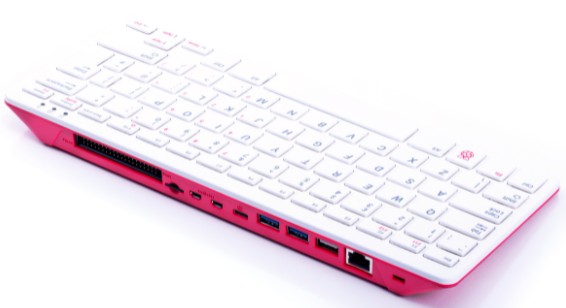
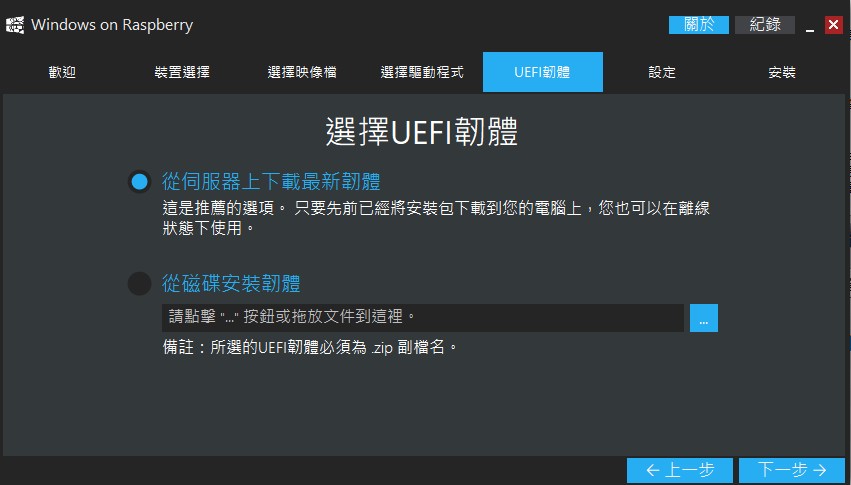
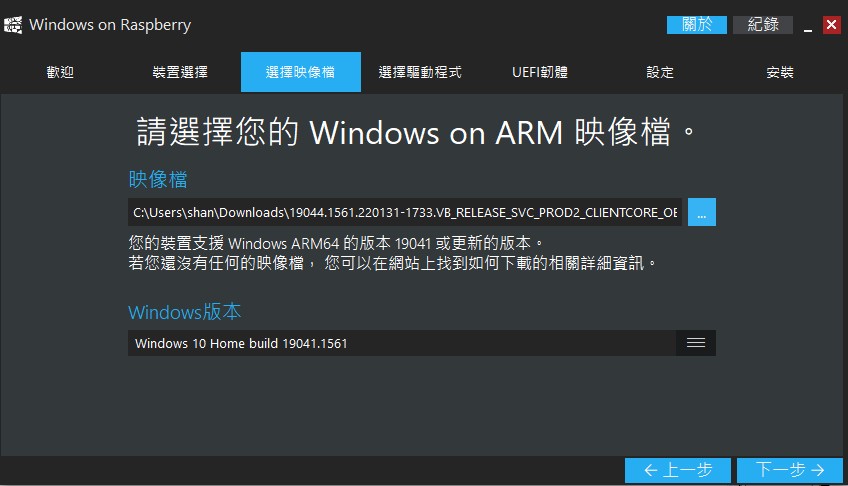
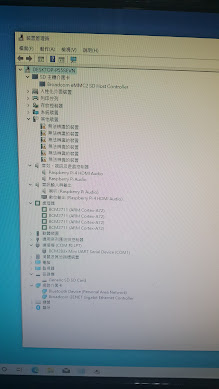
Pi p400安裝 win10


有些驅動是 找不到


============================================================

win32diskimager-1.0.0-install

針對 非win系統製作

這是用來 將 img 檔案  寫入 microˉSDHC

======================

imageusb(免安裝)

這是 來將 microˉSDHC裏頭系統製作成img

======================

找 kali

https://www.kali.org/get-kali/#kali-arm

====================

找ubuntu

https://ubuntu.com/download/raspberry-pi

====================

下載 wor project

WoR_Release_2.2.3>>WoR.exe

這是用來製作 win 到SDHC裏頭

https://www.worproject.ml/downloads

====================

下載 window Img for pi

https://uup.rg-adguard.net/


2018年6月30日 星期六

手機上APP(RPIRemote ) 用來連線Pi

透過設定+註冊,  可監視多個 RaspBian 系統, 超方便
指令:
sudo apt-get update
sudo apt-get install weavedconnectd
--------------------------------------
sudo weavedinstaller

手機 APP商店 輸入 RPIRemote


=====================================================
手機端:

======================================================
參考:
官方:  http://docs.weaved.com/docs

google Play: https://play.google.com/store/apps/details?id=ru.smartonet.rpiremote&hl=zh_TW


Raspbian 的 Thunderbird 收信軟體

這是一套非常好的收信軟體
最特別是你可以將存放profile目錄 指定
跨平台存放,... 你就可以隨時移轉到不同電腦喔....

sudo apt-get install thunderbird


2018年6月23日 星期六

raspbian 的 kmplayer

這是一種撥放影音軟體, 搭配 VLC media Player

sudo apt-get -f  upgrade
sudo apt-get install kmplayer


2018年4月28日 星期六

raspbian 的 VNC server

sudo apt-get install tightvncserver


啟動VNC server : vncserver
過程會問你, 設定密碼....
內定port:5901


2018年4月22日 星期日

raspbian 的webmin

後台整合式 管理介面
https://Pi的 IP:10000
使用 root /密碼
sudo apt-get update
apt-get install webmin

官方: http://www.webmin.com/deb.html


2018年2月24日 星期六

raspbian 執行dmesg

dmesg 查看目前系統訊息
因訊息都很多....
可以透過 grep 去針對要的訊息列表

dmesg | grep usb


2017年11月11日 星期六

raspbian的config.txt

位於  /boot

通常提供系統設定參數值
1.CPU cache
2.顯示設定
3. CPU+GPU記憶體配置
4.啟動設定
5.超頻
6.測試模式(類似安全模式)


2017年11月3日 星期五

raspbian 的cmdline.txt

位於: /boot
開機透過 bootloader傳送 載入 cmdline.txt 給 kernel


啟動時參照 提供給kernel啟動參數
通常依版本, CPU等, 內容不同


2017年10月14日 星期六

raspbian 設定固定IP


sudo vim /etc/network/interfaces  編輯網路設定

auto eth0
iface eth0 inet static
address 192.168.2.8
netmask 255.255.255.0
gateway 192.168.2.254

尤其 static 表示 靜態 IP

sudo /etc/init.d/networking restart   重新啟動網路

也可以在視窗 >右上方網路圖示

2017年10月8日 星期日

raspbian 查看kernel版本與更新

uname -a


kernel版本說明

自從 Raspbian 從 Wheezy 升級到 Jessie
幾個改變的地方:
1. 預設開機進入桌面環境,原本為純文字模式。
2. Raspbian 預設安裝的 GUI 程式使用 GTK+3 開發,原本為 GTK+2。
3. 預設安裝 LibreOffice 辦公室軟體和 Claws Mail 電子郵件軟體。
4. 預設安裝 BlueJ 的 Java 開發環境和 Greenfoot 的 Java 程式設計教學軟體。
5. 新增 raspi-config 的視窗設定工具。
6. 新增小工具,可安全移除 USB 儲存裝置(如隨身碟)。
7. 可以用一般使用者權限存取 GPIO,原本需要使用 sudo 提昇權限。
8. 預設安裝 scrot,可以使用 Print screen 快捷鍵抓取螢幕畫面。

升級方法:
https://www.raspberrypi.org/forums/viewtopic.php?f=66&t=121880


2017年9月30日 星期六

raspbian 的 kernel img

位於 /boot
一般 內定啟動是 kernel.img
而緊急kernel 是  kernel_emergency.img(kernel7.img)


若因特殊狀況, 要使用 緊急kernel
那就到 config.txt (在 /boot)
增加一行:  kernel=kerel_emergency.img(kernel7.img)


2017年9月23日 星期六

raspbian 安裝 moc音樂播放

sudo apt-get install moc

mocp
執行於後台, 跟其他工作無關

-s: 停止播放
-G:暫停播放或繼續撥放
-f:播放下一首歌
-r:播放上一首歌
-i:顯示現在歌曲訊息
-x: 停止播放跳出

man mocp


------------------------------------------------------------
Music On Console (version 2.5.0, revision 2668)
Usage:
 mocp [OPTIONS]... [FILE]...
-V --version           Print program version and exit
-h --help              Print usage and exit
-D --debug             Turn on logging to a file
-S --server            Only run the server
-F --foreground        Run server in foreground and log to stdout
-R --sound-driver LIST Use the first valid sound driver from LIST
                       (sndio, oss, alsa, jack, null)
-m --music-dir         Start in MusicDir
-a --append            Append the files/directories/playlists passed in
                       the command line to playlist and exit
-q --enqueue           Add the files given on command line to the queue
-c --clear             Clear the playlist and exit
-p --play              Start playing from the first item on the playlist
-l --playit            Play files given on the command line without modifying
                       the playlist
-s --stop              Stop playing
-f --next              Play the next song
-r --previous          Play the previous song
-x --exit              Shutdown the server
-T --theme theme       Use the selected theme file (read from ~/.moc/themes
                       if the path is not absolute)
-C --config FILE       Use the specified config file instead of the default
-O --set-option NAME=VALUE
                       Override the configuration option NAME with VALUE
-M --moc-dir DIR       Use the specified MOC directory instead of the default
-P --pause             Pause
-U --unpause           Unpause
-G --toggle-pause      Toggle between playing and paused
-v --volume (+/-)LEVEL Adjust the PCM volume
-y --sync              Synchronize the playlist with other clients
-n --nosync            Don't synchronize the playlist with other clients
-A --ascii             Use ASCII characters to draw lines
-i --info              Print information about the currently playing file
-Q --format FORMAT     Print formatted information about the currently
                       playing file
-e --recursively       Alias for -a
-k --seek N            Seek by N seconds (can be negative)
-j --jump N{%,s}       Jump to some position of the current track
-o --on <controls>     Turn on a control (shuffle, autonext, repeat)
-u --off <controls>    Turn off a control (shuffle, autonext, repeat)
-t --toggle <controls> Toggle a control (shuffle, autonext, repeat)
-----------------------------------------------------------------------

2017年9月16日 星期六

raspbian 安裝 scrot

sudo apt-get install scrot


延遲10秒
scrot -d 10

存放內定 /home/pi/


-h    Display additional help
-v    Get the current version
-d X  Add a delay of X seconds to the capture
-c    Add a countdown to a delayed capture
-s    Allow user to specific capture area with the mouse
-u    Capture the current active window
-q X  Specify the image quality percentage X (default 75)
-t X  Create a thumbnail version at a specified percentage size X
-e    Specify a command to run after the image is capture


$f  image path/filename (ignored when used in the filename)
$m  thumbnail path/filename
$n  image name (ignored when used in the filename)
$s  image size (bytes) (ignored when used in the filename)
$p  image pixel size
$w  image width
$h  image height
$t  image format
$$  prints a literal '$'
\n  prints a newline (ignored when used in the filename)

2017年9月9日 星期六

2017年9月1日 星期五

raspbian 安裝中文輸入法

首先安裝字型
安裝文鼎中文字型全部
sudo apt-get install fonts-arphic*
標準楷書
sudo apt-get install fonts-moe-standard-kai

安裝輸入法
sudo apt-get install scim scim-tables-zh scim-chewing scim-gtk-immodule im-switch


重開機後,以Ctrl-Space即可切換輸入法


2017年8月25日 星期五

Raspbian 安裝 LAMP(Linux, Apache, MySQL, PHP)

LAMP(Linux, Apache, MySQL, PHP)


sudo apt-get update
sudo apt-get install apache2 php5 php5-mysql mysql-server

安裝後的網頁目錄:   /var/www

查看訊息:
man apache2
man php5
man mysql


2017年8月18日 星期五

raspbian 安裝 gimp

GIMP說明:  https://zh.wikipedia.org/wiki/GIMP
一種免費繪圖軟體, 據說...google首頁那些字的圖, 都是這套軟體 做的..

sudo apt-get install gimp

開啟: